The versatility of Markdown lies in its simplicity, making it one of the most effective tools for converting plain text to rich HTML. For those new to the world of Markdown, it’s a lightweight markup language that allows you to create structured documents with ease. However, there’s often a pesky hurdle to overcome: how can we preview Markdown files without the need to open a dedicated text editor or application? Fear not—using OSX’s Finder, you can preview these files as effortlessly as you would an image or PDF. In this guide, I’ll walk you through the steps to enable Markdown previews directly from Finder using a nifty tool called QLMarkdown.
Understanding Homebrew: Your New Best Friend
Before we dive into the setup, let’s take a moment to talk about Homebrew. Think of Homebrew as your personal package manager for macOS—an automated assistant that simplifies the installation of software on your system. It handles everything from downloading to unpacking and installing applications. With that context, let’s harness the power of Homebrew to get QLMarkdown up and running.
To install QLMarkdown via Homebrew, follow these straightforward steps:
- Open your terminal.
- Paste the following line and press enter:
brew install --cask qlmarkdown
This command will pull QLMarkdown directly from Homebrew’s official casks. The --cask option signals to Homebrew that you’re installing a binary package rather than a typical one. If you haven’t installed Homebrew yet, don’t worry—it’s easy to get started. Just follow the instructions on their official website.
Previewing Markdown in Finder
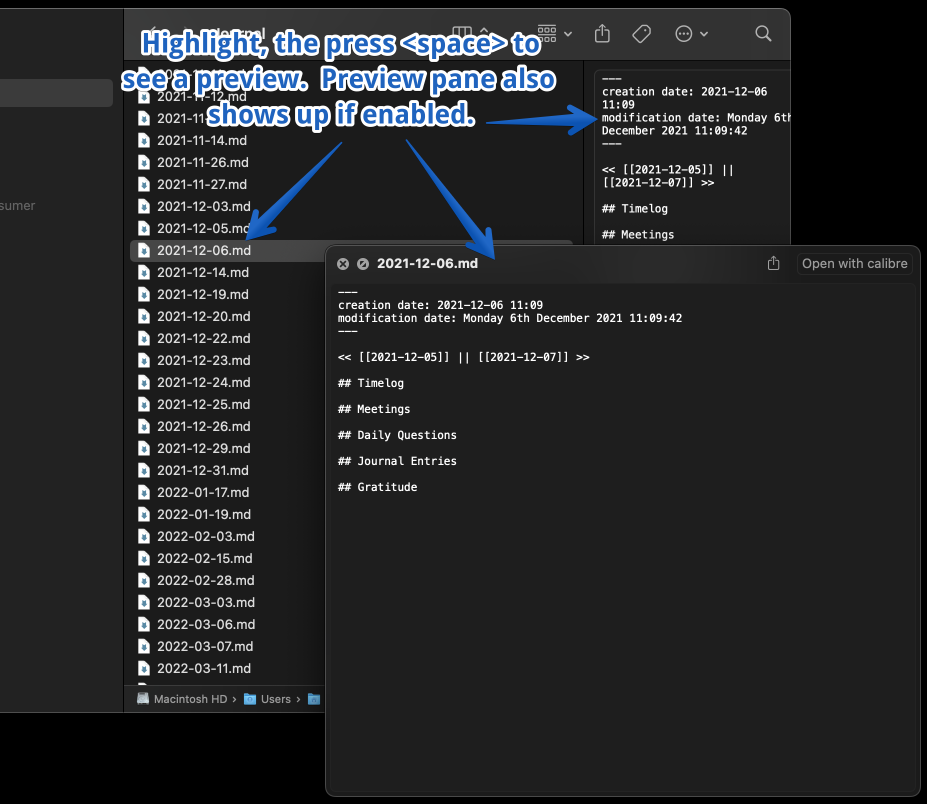
Once you’ve successfully installed QLMarkdown, it’s time to see it in action. Here’s how to preview Markdown (.md) files directly from Finder:
- Open Finder and navigate to the directory containing your .md file.
- Click on the .md file you wish to preview.
- Press
Spaceto bring up the Quick Look preview.
Voilà! You should now see a rendered preview of your Markdown file, right there in Finder.
Wrapping Up
The steps outlined above provide an efficient and straightforward method to preview Markdown on OSX. With just a simple addition via Homebrew, you can eliminate the need for extra applications or text editors. This process exemplifies how understanding and tweaking your tools can enhance your workflow. By combining the strengths of QLMarkdown, Finder, and Homebrew, you can make your Markdown previews more accessible and convenient.
So, go ahead—explore, experiment, and happy coding!