Ever found yourself staring at a terminal output so lengthy that the scrollback buffer limit left you in the dark about where things went awry? It’s a common frustration, but fear not! Let’s delve into how you can enhance the scrollback limit in iTerm2, so you can keep your debugging skills sharp and your output history rich.
Understanding the Scrollback Limit in iTerm2
Before we get our hands dirty, let’s unpack the concept of the ‘Scrollback Limit.’ Think of it as a safety net for your terminal output. By default, iTerm2 allows you to scroll back through 1,000 lines of output. While this is usually sufficient, there are moments—like when you’re running extensive scripts or analyzing logs—when you’d prefer a deeper dive into your terminal’s past. That’s where increasing the scrollback limit comes into play.
Increasing the Scrollback Limit in iTerm2
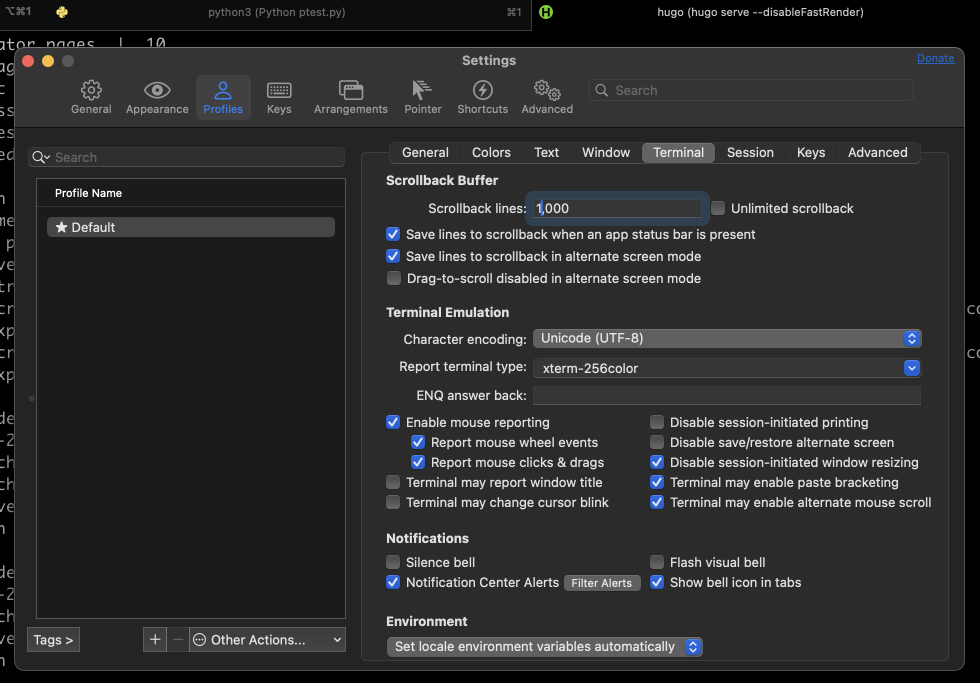
Ready to expand your horizons? Here’s a straightforward guide to boost the scrollback limit in iTerm2:
Open iTerm2: Start by launching the iTerm2 terminal on your machine.
Access Preferences: Navigate to
iTerm2 > Preferences. This will bring up the preferences dialogue box, your command center for customization.Go to Profiles: Within the dialogue box, head over to the
Profilestab. This is where the magic happens.Select Terminal Sub-tab: Click on the
Terminalsub-tab within the Profiles section.Adjust Scrollback Buffer: Here, you’ll find the
Scrollback Bufferoption. To unlock unlimited scrolling, selectUnlimited Scrollback. Alternatively, if you prefer a specific limit, deselectUnlimited Scrollbackand input your desired number in theScrollback Linesbox.Save and Close: Once you’ve made your adjustments, simply close the dialogue box. Your changes will be saved automatically.
Now, whether you opt for Unlimited Scrollback or set a custom limit, you can confidently scroll back through your terminal output. This means fewer headaches during debugging and an enhanced ability to trace errors back to their source.
Happy coding, and may your scrollback history be ever expansive!